
The end times are nigh. The prophecies have been fulfilled, and the heralds have proclaimed a date for the end of it all. That’s right, on May 20, 2026, Amazon will cease service for all Kindle devices made before 2013. So what does that mean for those of us who have been rocking the same e-reader for over 14 years? I’m glad you asked.
What’s happening with the end of Kindle service?
According to the official email from Amazon (below), there are two points to keep in mind. The first is the total disconnect from Amazon services. You will not be able to download any purchased books to your old Kindle nor purchase anything from Amazon via your device. You can still read any books you’ve already downloaded, but going forward, you won’t be able to add e-books purchased from Amazon without jumping through a few hoops. The second is that you won’t be able to register these devices with Amazon. In other words, you won’t be able to sign in or access any of your account’s e-books on your old Kindle devices.
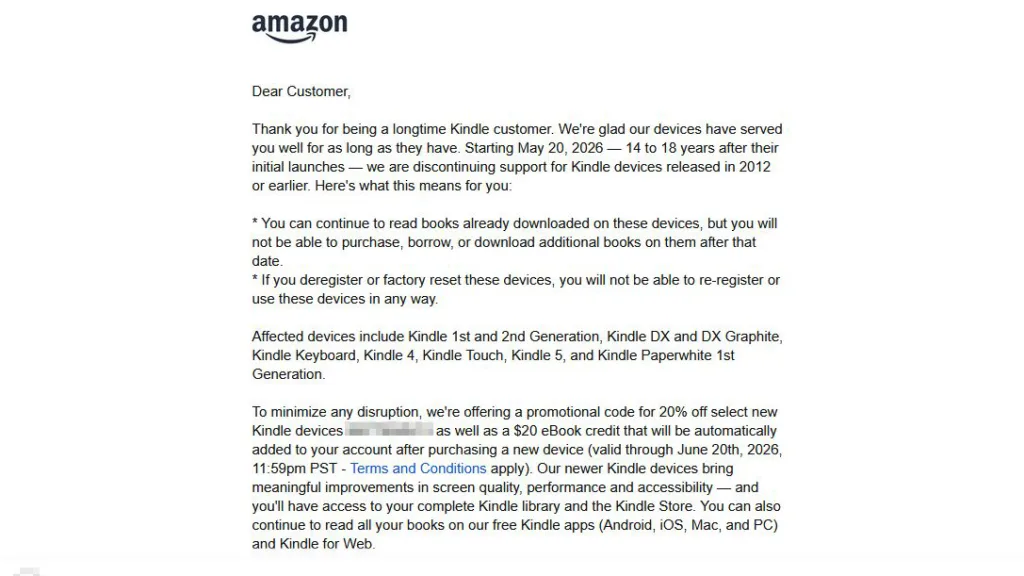
Around this second point, Amazon uses some ominous language. In the email sent out to owners of older Kindles, Amazon says, “If you deregister or factory reset these devices, you will not be able to re-register or use these devices in any way,” (emphasis ours). We reached out to Amazon about this language but weren’t given a clear answer.
Based on what is known about how Kindles work, if you deregister your old Kindle, you should still be able to sideload and read your books. There is no known mechanism by which Amazon can brick your old devices, but given some of the e-book shenanigans Amazon has pulled recently by making it harder to sideload or download your purchases, I wouldn’t put it past the company. Still, we have tested factory resetting an old Kindle Keyboard, and as of now, it can sideload books without being registered with Amazon.
- Kindle 1st Generation
- Kindle 2nd Generation
- Kindle DX/DX Graphite
- Kindle Keyboard
- Kindle 4
- Kindle 5
- Kindle Touch
- Kindle Paperwhite 1st Generation
How to manage the end of your Kindle service?
If you received an email from Amazon, you also got a code for a 20% discount on “select new Kindle devices,” which works out to a new Kindle Basic for just under $90 (assuming it’s on the list of eligible devices). That’s not a bad deal, especially if you don’t care about digital ownership and you’re on Amazon for Kindle Unlimited. But, despite what hardware manufacturers would have you believe, just because your device is old doesn’t mean that it’s worthless or should be tossed in the bin. Depending on how adventurous you are, there are lots of ways to keep using your old Kindle.
Where to buy books for your Kindle besides Amazon
Even though there are methods to download your Amazon books and strip their DRM, for the most part, if you want to continue using your old Kindle, you will be cut off from the Amazon ecosystem and the millions of e-books in its library. Thankfully, Amazon is far from the only game in town, and with software like Calibre available, you can convert your e-books into the Kindle-friendly MOBI format and transfer them to your device via USB.
- Google Play Books – The Alphabet-owned bookseller is often glossed over in discussions of online bookstores, but with a library of e-books as large or larger than Amazon’s, you shouldn’t overlook it.
- Kobo – When it comes to the breadth of e-books in its library, Kobo is close behind Amazon. Plus, if you decide to get a newer reader, Kobo’s integration between its e-readers and its retail site is rivaled only by Amazon.
- Barnes & Noble – Among the big booksellers, Barnes & Noble is best known for its physical locations, but its e-book library still numbers in the millions.

There are other sites out there that sell e-books, but none of them can match the scale of these three, nor can they match their prices.
Use Calibre to manage your Kindle’s e-book library
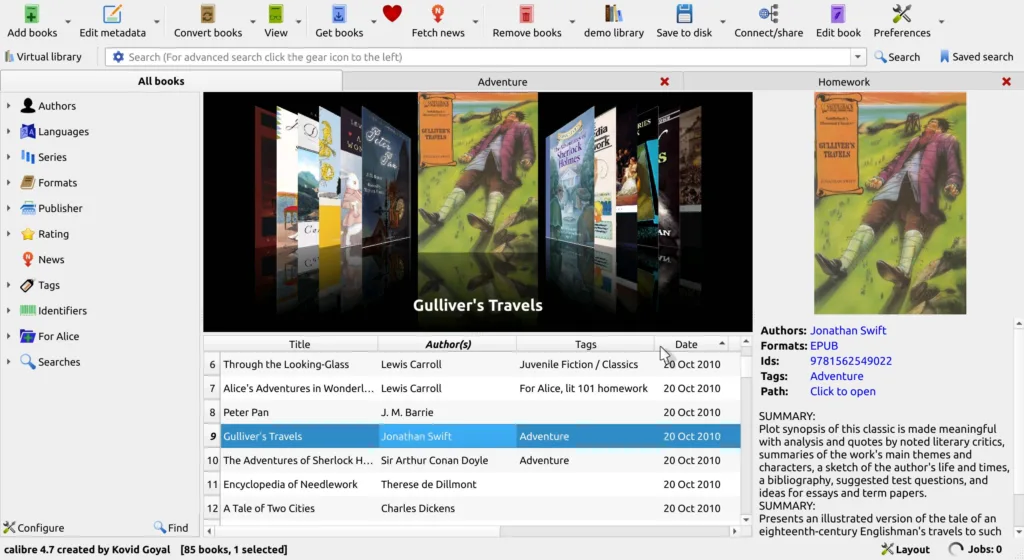
At its simplest, Calibre is software to manage your collection of e-books, but underneath that quotidian veneer is a suite of powerful tools dedicated to managing and manipulating e-books of all formats. If you want to continue reading new books on your old Kindle, you will need to become proficient at using Calibre to take your downloaded e-books, strip them of their DRM, and convert them to a readable format.
This may sound like a lot of work, and there is some setup involved, but it’s actually pretty easy. Plus, there are a ton of resources online in addition to the active and helpful community. The only e-book formats these older Kindles can read are AZW and MOBI, and every vendor except Amazon sells their books in EPUB, so, for the most part, file conversion is your only option, and Calibre is the best choice in this space.
Jailbreak your Kindle to unlock new features
I know I just said that file conversion is the only option if you want to read EPUB files on your Kindle, but that’s not really true if you’re willing to jailbreak the device. In the broader e-reader community, Amazon is notorious for how tightly it controls what can be installed on its hardware. Jailbreaking your Kindle just means that you open up the hardware so you can install new software on it.
Remember when I said that Calibre had some setup to use all of its features? Well, if you want to dabble in jailbreaking, you’re going to have to be willing to put in a good bit more work and be above average at following instructions. However, if you know how to navigate your Kindle’s file structure, it’s really not that bad. The payoff is that you can customize your software and your UI to your liking.
Do not go gentle into that good night
Support is ending for the early-model Kindles, but that doesn’t mean you have to stop using them. Even without access to Amazon’s networks, these little guys are still more versatile (albeit larger) than Xteink’s tiny e-readers. If you don’t have money in your budget for a new e-reader, or you’re too emotionally invested in the device you’ve had for the past decade to let it go, don’t let Amazon scare you into abandoning your beloved Kindle.